Spry Browser
One window. Many identities. — In development
Download
Spry Browser for Mac is ready to try. Download the disk image, open it, and copy Spry Browser into your Applications folder.
- Requires a Mac with Apple silicon (M1 or later) and macOS 13 Ventura or later.
- Signed and notarized by Apple, so it opens without a security warning.
- Version 154.0.8037.51, built on the Chromium release of the same number.
- Size 119 MB. SHA-256:
97f3f79e5a61425a58a18d2c537f6b634a22fdaff1f87e1e371bf35505256b3c
Spaces and identities
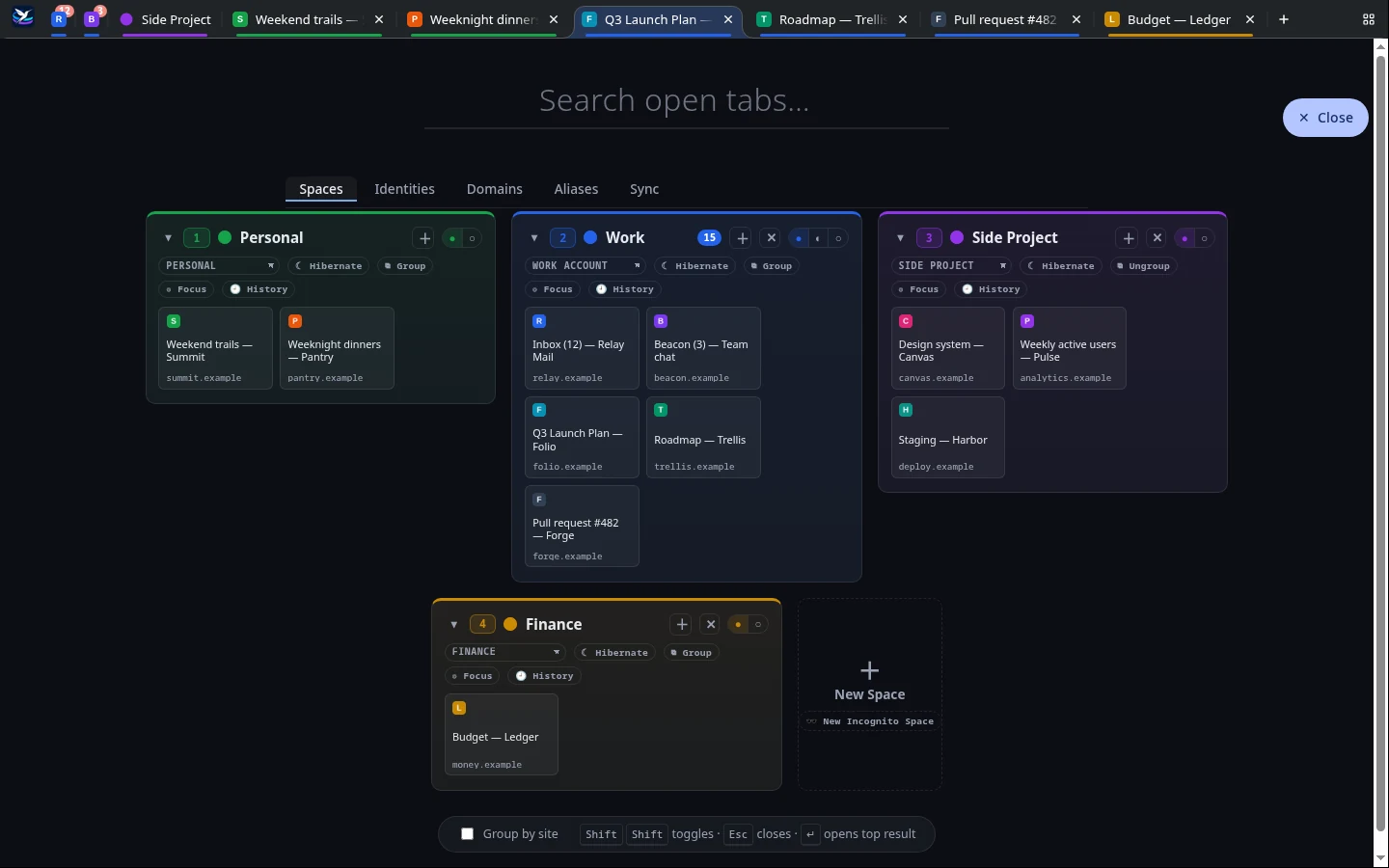
Each Space runs on its own identity, with its own cookies and logins, so you can be signed into the same site as different people side by side. Work, personal, and client accounts stop colliding without juggling profiles or windows.
Sites can belong to a Space. Open one somewhere else, and Spry offers to move it where it belongs. Links clicked in other apps ask which Space should open them.
Staying on top of a lot of tabs
- The overview opens with a double tap of Shift. Rename, recolor, group, hibernate, and reorder Spaces, manage identities, and search every open tab.
- Keyboard first: Ctrl+1 through 9 shows or hides a Space, and Ctrl+Shift+E starts a new one.
- Focus mode hides everything except the Space you're working in.
- Groups collapse a Space to a single tab, with its own tabs in a second row.
- Hibernation frees a Space's memory but keeps its tabs, which reload when you return.
- Unread counts from page titles, and a dot for background changes, show what needs attention.
- Incognito Spaces keep nothing: no history, no restore, and no sync.
- Sane tab order: new tabs open next to their Space's tabs, and closing one returns you to the tab you came from.
A thin layer over Chromium
Spry never maintains its own fork of Chromium. Its changes are a small, layered set applied by script to a pristine Chromium release, so it can follow new releases closely instead of falling behind on security fixes. Extensions and sites work the way they do in any Chromium browser.